
An assessed reconciliation is also carried out for balances if this is enabled.
From the result of the assessed reconciliation on the "Accounts" tab, you can find the following further information compared to the classic reconciliation:
|
Column |
Meaning |
|---|---|
|
Interest OK |
The icon of this column indicates the status of the interest:
|
|
Accrued interest Target |
Target balance of the accrued interest. |
|
Accrued interest Actual |
Actual positions of the accrued interest from the database. |
|
Accrued interest Deviation |
Absolute deviation between target and actual positions of the accrued interest. |
|
Accrued interest Deviation in % |
Percentage deviation between target and actual positions of the accrued interest. |


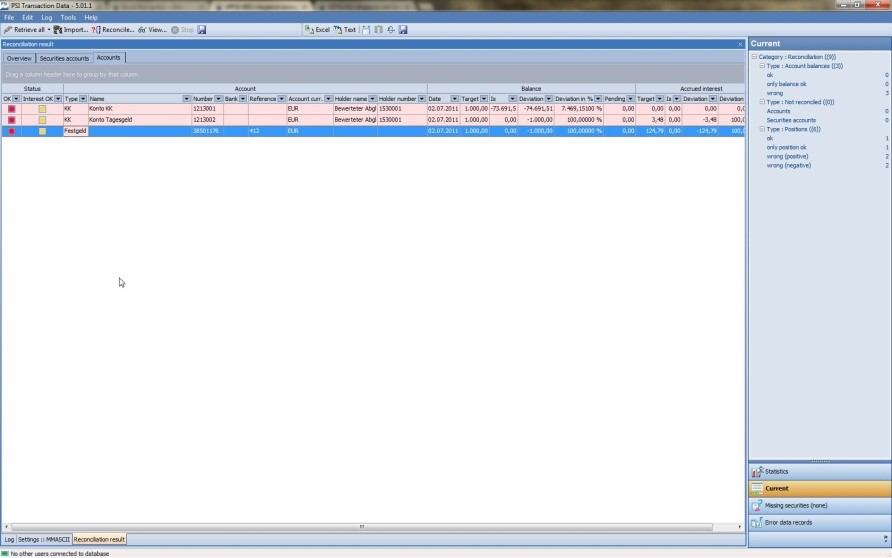
Regardless of whether a target position is delivered, your PSI determines an actual value from the database and calculates the deviation. If no target value is transmitted, the column entries of "Target", "Deviation" and "Deviation in %" are set to "n/a".
You can find the total amounts of the deviations for the accrued interest in the table. Values that are not set ("n/a") are calculated as zero. You can group, for example by account numbers, to obtain the total deviation of the interest displayed for an account.

Explanation of the colours in the table:
|
Colour |
Meaning |
|---|---|
|
Red |
Balance incorrect |
|
Yellow |
Only balance correct |
|
Green |
All values correct |
In detail:
|
Balance |
Accrued interest |
Result |
|---|---|---|
|
1 |
1 |
Green |
|
1 |
0 |
Yellow |
|
1 |
- |
Green |
|
0 |
0/1/- |
Red |
The following applies:
|
Value in the top table |
Meaning |
|---|---|
|
1 |
Target and actual values match |
|
0 |
Target and actual values do not match |
|
- |
Target not specified |